
Top 10 Industrial Personal Computers for Global Buyers?

Choosing an Industrial Personal Computer is rarely a simple specification exercise. Global buyers need stable performance, long product lifecycles, flexible connectivity, and dependable support. A fast processor alone cannot guarantee reliable operation beside motors, dust, heat, or continuous vibration.

This guide examines ten industrial computer models for factories, warehouses, transport systems, energy sites, and outdoor control cabinets. Each selection is considered through practical criteria, including processor performance, operating temperature, enclosure design, mounting options, storage protection, and expansion capacity. Port layouts matter too. A machine may need dual Ethernet, isolated serial ports, USB connections, or display outputs for older equipment.

Real deployment details often decide the result. A fanless computer can reduce maintenance near dusty production lines. A wide-temperature design can support equipment in an unconditioned cabinet. However, “rugged” does not mean indestructible. Installation quality still matters. Poor airflow, unstable power, or incorrect grounding can shorten service life.

The ranking also considers vendor documentation, warranty clarity, technical support, and regional availability. Buyers should verify current certifications, voltage requirements, software compatibility, and delivery conditions before purchase. Published specifications are useful, but they may not reveal every field limitation. That deserves attention.

There is no universal winner. A compact edge computer may suit a packaging machine, while a larger expandable system may better serve machine vision or SCADA workloads. Budget pressure can also change the decision. The lowest purchase price may create higher replacement costs later.

These ten options offer a practical starting point for comparison. Careful testing remains essential.
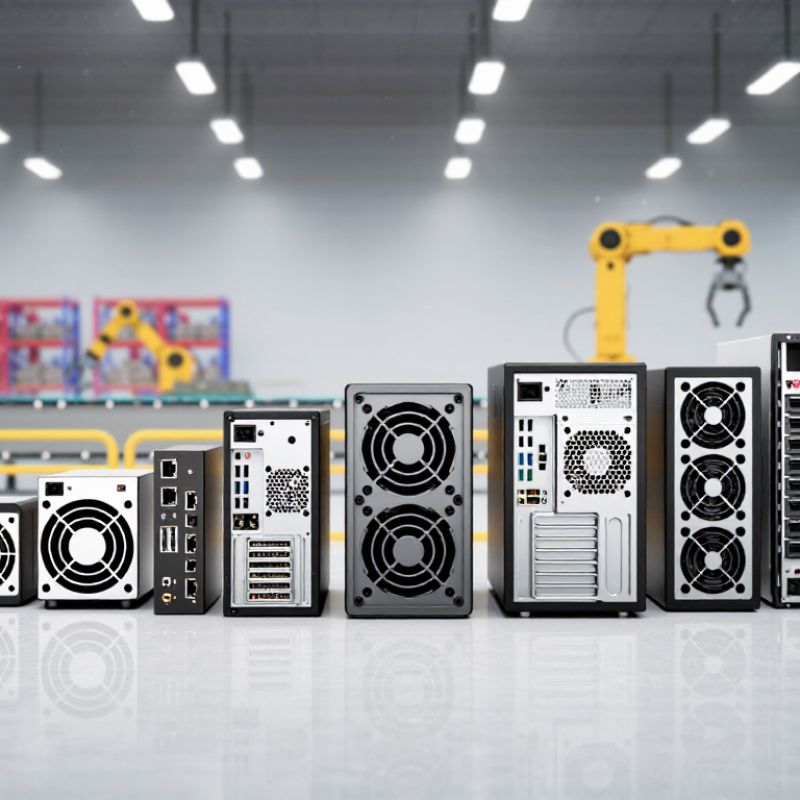
Top 10 Industrial Personal Computers for Global Buyers?

What Makes an Industrial Personal Computer Suitable for Global Use

Top 10 Industrial Personal Computers for Global Buyers?

A globally suitable industrial personal computer is more than a rugged box. It must work across changing environments, power systems, and operating practices. In factory deployments, stable performance often depends on small details. Wide-range DC input, surge protection, and secure cable connections reduce unexpected shutdowns. Fanless cooling can limit dust intake, but it may struggle inside a sealed cabinet at high temperatures.

Environmental protection also matters. Buyers should check the tested IP rating, operating temperature range, vibration resistance, and electromagnetic compatibility. A touchscreen may need glove-friendly operation and sunlight readability. Storage should use industrial-grade solid-state drives, especially where vibration or frequent power loss is possible. Hardware with replaceable memory and accessible storage can reduce long-term maintenance.

Global use requires more than hardware. Confirm support for local voltage standards, regional certifications, multiple languages, and widely available replacement parts. Remote monitoring, watchdog timers, and secure firmware controls help technicians diagnose a frozen system from another site. The supplier should provide clear manuals, test reports, lifecycle information, and realistic repair times. Ask for evidence, not broad claims.

No computer fits every site. A model proven in a clean warehouse may fail beside a furnace. This is where buyer judgment matters. Site surveys, pilot testing, and recorded temperature measurements often reveal weaknesses that brochures miss. I would also question overly long warranty promises without service coverage. Reliability is built through verified details, not confident wording.

Key Specifications for Comparing Industrial Personal Computers

Choosing among the top 10 industrial personal computers requires more than comparing processor speed. A practical evaluation starts with the working environment. Check the CPU generation, memory capacity, and storage type against actual software demands. A factory dashboard may run well with 8 GB of RAM, while machine vision usually needs more. Solid-state storage handles vibration better than mechanical drives. Small details matter.

Temperature ratings deserve close attention. A computer installed beside a furnace needs wider operating limits than one placed in a clean control room. Review shock, vibration, humidity, and dust protection ratings. An enclosed cabinet can become surprisingly hot. Measure airflow instead of trusting the room temperature. Fanless designs reduce dust intake, but they may transfer heat into the chassis.

Connectivity can decide long-term value. Count Ethernet, USB, serial, display, and digital I/O ports before ordering. Confirm whether expansion slots support future communication cards. Also inspect input voltage, surge protection, mounting options, and remote maintenance features. A five-year availability commitment can reduce replacement risk. Yet specifications alone are not proof. Request test reports, lifecycle policies, and support response details. Field testing is still wise. A checklist can miss reality. One overlooked port or unstable driver may stop a production line, so buyers should compare documented performance with site conditions and revise their assumptions when evidence disagrees.

Top 10 Industrial Personal Computers and Their Core Strengths

Top 10 Industrial Personal Computers and Their Core Strengths

Industrial personal computers support factories, warehouses, transport systems, and outdoor monitoring sites. Their value depends on reliability, serviceability, and fit.

1. Fanless box PCs reduce dust entry and machine noise. They suit control cabinets with limited airflow.

2. Panel PCs combine display and computing functions. Operators can view alarms beside production lines.

3. Rack-mount PCs offer strong expansion options. They fit server cabinets and centralized control rooms.

4. DIN-rail PCs save cabinet space. Their compact shape helps installers organize crowded electrical panels.

5. Rugged edge computers process sensor data near machines. This reduces network delays during real-time operations.

6. Embedded controller PCs provide stable automation control. They often support serial, Ethernet, and industrial I/O connections.

7. Vehicle-mounted PCs tolerate vibration and changing temperatures. They assist fleet tracking and warehouse navigation.

8. Stainless steel panel PCs resist moisture and frequent cleaning. They are useful in food and pharmaceutical environments.

9. High-temperature industrial PCs operate near ovens, engines, and outdoor enclosures. Their thermal design needs careful validation.

10. Modular industrial PCs allow memory, storage, and interface upgrades. This can extend equipment life, though compatibility checks remain essential.

In my field experience, cooling failures often appear before processor failures. Cable strain also causes avoidable downtime. No design wins every site. A fanless computer may overheat in a sealed cabinet. A rugged model may cost more than the application requires. Buyers should test vibration, humidity, storage temperature, screen visibility, and maintenance access before deployment. Real operating conditions matter more than impressive specifications.

Industry Applications and Environmental Requirements by Model

Top 10 Industrial Personal Computers for Global Buyers?

Industrial PCs should match the application, not merely the processor. Fanless box models suit dusty cabinets and remote stations. Panel PCs support machine interfaces, especially where operators need gloves. Rackmount systems handle data acquisition and factory servers. DIN-rail computers fit compact control cabinets. Embedded boards serve original-equipment designs. Vehicle computers require shock resistance and stable 12- or 24-volt input. GPU edge models support machine vision but generate more heat. Stainless-steel panel units suit food and pharmaceutical areas. Modular systems help mining and energy sites. Rugged portable units support field maintenance. According to the International Federation of Robotics, 541,302 industrial robots were installed worldwide in 2023. That growth increases demand for dependable local control and inspection.

Environmental requirements can change the correct model quickly. A fanless computer reduces moving-part failures, but it may throttle inside a hot enclosure. Front-panel IP65 protection helps against water jets, yet the rear may remain vulnerable. Buyers should review IEC 60068 vibration, shock, temperature, and humidity testing. Electromagnetic immunity should also align with IEC 61000-6-2. A common field mistake is trusting an attractive temperature range without checking storage limits, cable glands, and airflow. I would also question touchscreen durability; frequent glove use can expose weak surfaces earlier than laboratory tests suggest.

Tips: Request full test reports, not marketing phrases. Confirm input voltage, mounting depth, service access, and regional compliance. Test the computer with real sensors and cables. Small details matter.

Top 10 Industrial Personal Computers for Global Buyers

Industry Applications and Environmental Requirements by Model

Representative industrial computer configurations. Environmental ratings and performance values should be verified against the final product datasheet before purchase.
Model Form Factor Typical Computing Platform Memory & Storage Industrial Interfaces Typical Industry Applications Operating Temperature Environmental Requirements Recommended Buyer Profile
IPC-01 Fanless Box Compact fanless embedded box Low-power x86 processor, 2–4 cores, hardware virtualization support 8–16 GB DDR4/DDR5; 128–512 GB industrial SSD 2–4 Ethernet ports, USB, HDMI/DisplayPort, isolated RS-232/485, digital I/O Machine monitoring, small PLC gateway, building automation, remote I/O Approximately −20°C to +60°C Fanless thermal design; DIN-rail or wall mounting; resistance to dust and light vibration System integrators needing low maintenance and continuous operation
IPC-02 DIN-Rail Controller DIN-rail mounted control computer Embedded x86 or ARM processor optimized for control workloads 4–8 GB memory; 64–256 GB eMMC or SSD Dual Ethernet, CAN bus, RS-485, USB, isolated digital inputs and outputs Factory automation, energy management, conveyor control, utility cabinets Approximately −25°C to +70°C 24 VDC input commonly used; surge protection and electrical isolation are important Panel builders and control engineers working with limited cabinet space
IPC-03 Panel PC Integrated touchscreen panel computer Low- to mid-range x86 processor for HMI and visualization 8–16 GB memory; 128–512 GB SSD Projected capacitive or resistive touchscreen, Ethernet, USB, serial ports, optional fieldbus Operator interfaces, process control, packaging lines, warehouse terminals Approximately 0°C to +50°C; extended versions may reach −20°C to +60°C Front-panel IP65 is common; glove operation, sunlight readability, and chemical resistance may be required Manufacturers requiring an integrated HMI with minimal external wiring
IPC-04 Rackmount Server 19-inch, 1U or 2U rackmount industrial server Multi-core server-class processor with ECC memory support 32–128 GB ECC memory; redundant SSD or enterprise storage options Multiple Gigabit or 10GbE ports, USB, serial, dedicated management interface, RAID support SCADA servers, manufacturing databases, video management, edge virtualization Typically +5°C to +40°C; rugged configurations may support −10°C to +50°C Controlled cabinet or data-room airflow; redundant power and storage are recommended for high availability Industrial IT departments requiring centralized computing and data services
IPC-05 GPU Edge Computer High-performance fanless or filtered-air edge box Multi-core processor with discrete or integrated GPU for parallel workloads 16–64 GB memory; 512 GB–2 TB NVMe SSD PoE-capable Ethernet, multiple display outputs, USB 3.x, serial, camera I/O, optional accelerator slot Machine vision, defect inspection, robotics, predictive maintenance, AI inference Approximately −20°C to +55°C, depending on GPU power and cooling design Thermal headroom, vibration control, high-speed storage endurance, and stable DC power are critical Automation developers deploying real-time analytics at the production edge
IPC-06 Vehicle Computer Rugged mobile or vehicle-mounted computer Low-power multi-core processor with wide-voltage DC input 8–32 GB memory; 128 GB–1 TB SSD CAN bus, isolated serial, Ethernet, USB, GNSS, Wi-Fi, LTE/5G options Fleet management, automated guided vehicles, public transport, mining vehicles Approximately −30°C to +70°C Ignition control, load-dump protection, conducted-noise immunity, shock and vibration resistance Mobile-equipment manufacturers and fleet technology providers
IPC-07 Marine Computer Sealed or semi-rugged marine embedded computer Industrial multi-core processor for navigation and monitoring software 8–32 GB memory; 256 GB–1 TB SSD NMEA-compatible serial interfaces, Ethernet, USB, CAN, display outputs, GNSS options Vessel monitoring, port logistics, marine automation, offshore equipment Approximately −20°C to +55°C Corrosion protection, salt-mist resistance, humidity control, vibration tolerance, and isolated power are important Marine system integrators operating in humid and vibration-prone environments
IPC-08 Hazardous-Area Computer Certified enclosure-mounted or remote-terminal computer Low- to mid-range industrial processor with reduced heat generation 8–16 GB memory; 128–512 GB solid-state storage Ethernet, serial communication, isolated I/O, intrinsically safe or protected peripheral interfaces Oil and gas, chemical processing, pharmaceutical production, grain handling Commonly −20°C to +50°C; certification-dependent Requires applicable hazardous-location certification, enclosure protection, temperature limitation, and approved installation methods Buyers operating in classified areas where ordinary computers are unsuitable
IPC-09 Outdoor Edge Computer Weather-resistant outdoor edge enclosure Efficient multi-core processor with remote management capability 8–32 GB memory; 256 GB–1 TB SSD Gigabit Ethernet, fiber or cellular uplink, USB, serial, digital I/O, GNSS options Traffic systems, renewable energy, outdoor surveillance, telecom infrastructure Approximately −30°C to +60°C Weatherproof enclosure, UV-resistant materials, condensation control, surge protection, and wide-voltage input Infrastructure operators needing unattended computing outside controlled buildings
IPC-10 Modular Expansion PC Industrial box PC with configurable expansion slots Mid- to high-range multi-core processor for mixed control and data workloads 16–64 GB memory; 512 GB–2 TB SSD or RAID storage Multiple Ethernet ports, PCIe/mini-PCIe expansion, serial, USB, fieldbus, digital I/O Large-scale automation, test systems, robotics cells, telecommunications, transportation Approximately −20°C to +60°C Expansion cards may increase heat and power demand; cabinet airflow, EMC control, and mechanical retention are essential Global OEMs requiring long lifecycle support and application-specific expansion
Selection note: Global buyers should confirm power input range, regional electrical requirements, operating altitude, EMC performance, ingress protection, hazardous-area certification, software lifecycle, spare-part availability, and compliance documentation for the intended installation.

Global Buying Factors: Compliance, Support, Cost, and Lifecycle Value

Global buyers should treat an industrial personal computer as a production asset, not a desktop with a metal case.

Compliance starts with the destination market and operating environment. Check EMC, electrical safety, environmental, and cybersecurity evidence before comparing prices. Ask for test reports, declaration documents, and firmware update policies. IEC 62443 alignment is useful for connected automation, although certification alone does not prove secure deployment. That distinction matters.

Support matters.

A clear warranty, spare-unit plan, and regional repair channel can protect production during a weekend failure. The 2024 Annual Outage Analysis reported that 54% of surveyed outages cost more than $100,000. That figure concerns broader infrastructure, but the lesson applies: downtime can quickly exceed the computer’s purchase price.

Buyers should request response times, escalation contacts, and repair procedures in writing. “Global support” can mean very little.

Lifecycle value requires more than a low invoice.

Confirm processor availability, memory limits, storage endurance, operating-temperature ratings, and planned replacement windows. The 2024 Cost of a Data Breach Report placed the global average breach cost at $4.88 million, reinforcing the need for controlled updates and access management.

Yet overengineering every installation wastes capital. A small inspection station may not need the same protection as a continuous-process controller.

Field evaluations often expose this uncomfortable truth: specifications look impressive, while service access remains awkward. Test the actual cabinet, cables, airflow, and maintenance routine before approving the final configuration.

×
img

    Contact Info

    Phone number

    661-392-8948

    Address info

    3451 Pegasus Drive, Bakersfield, CA USA